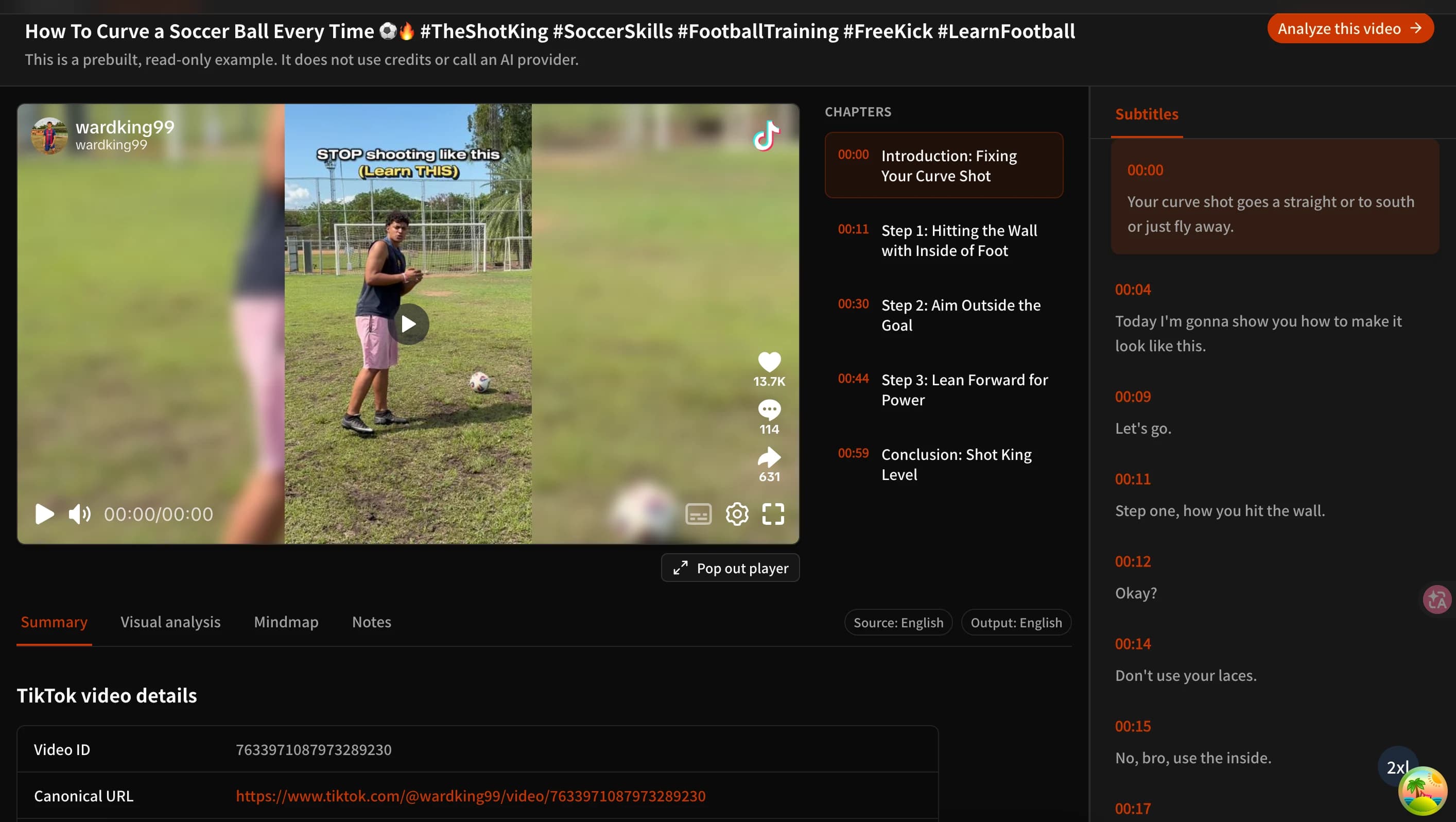
How to Summarize TikTok Videos with AI (Free TikTok Video to Text Summarizer)
Learn three practical ways to summarize TikTok videos with AI, turn usable speech into text, review visual details, and try TubeTutor free without signing up.
TikTok is full of tutorials, product reviews, explainers, travel tips, and industry examples. The problem is not finding another video. It is deciding which videos deserve your time and turning the useful ones into something you can review later.
An AI TikTok video summarizer can organize the available evidence into readable text before you watch every second. A good tool should also tell you what the summary is based on. Did it use a transcript? Is it limited to the post caption and other metadata? Was visual information analyzed separately?
This guide compares three ways to summarize a TikTok video, including a free TubeTutor guest workflow that does not require an installation or account. Signed-out visitors can use one cumulative preview for one supported video up to 5 minutes, in one output language, without using account credits. It does not reset daily, and guest results are cleared after leaving or reloading the page.
Why summarize TikTok videos?
Filter a crowded feed faster
Recommendations never stop, but only a small share of them may be relevant to your research, work, or learning goal. A concise TikTok summary can show the topic, supported key points, and likely value of a video before you commit to a full viewing.
The summary is a screening tool, not a replacement for the source. If a name, number, quotation, or instruction matters, return to the original video and check it in context.
Turn fast tutorials into usable steps
Recipe clips, exercise demonstrations, software walkthroughs, and product guides often compress several actions into a short timeline. Text, chapters, and notes make those actions easier to revisit than a video that must be paused and rewound repeatedly.
Some instructions exist only on screen. A transcript may capture the narration while missing a menu, ingredient, gesture, warning, or configuration value. That is why transcript evidence and visual evidence should remain separate.
Build a more consistent competitor review
Creators and marketers can summarize several public examples with the same research template: topic, opening hook, supported claims, visible technique, offer, and call to action. This does not turn TubeTutor into a bulk analytics platform, but it does create more comparable records than memory alone.
AI may misread irony, crowded audio, brand names, or specialist language. Verify exact wording and performance claims before putting them into a report or campaign plan.
Save ideas as searchable notes
A useful workflow, prompt, product idea, or explanation should not stay buried in watch history. Converting a supported TikTok video into a summary and timestamped notes gives the idea a structure you can search, edit, and connect to later work.
3 ways to summarize a TikTok video
| Method | Basic workflow | Advantages | Limitations |
|---|---|---|---|
| 1. TubeTutor | Copy a full TikTok video URL, paste it into TubeTutor, choose an output language, confirm preflight, and review the available Summary, Subtitles, Chapters, and Visual Analysis. | Free guest trial, no installation, multiple output languages, AI transcription when usable speech exists, and a clearly labeled metadata-only fallback when supported. | Only supported public videos can be processed. Not every post produces every result. Guest work is temporary, and some saved-project exports require an eligible account. |
| 2. TikTok captions and comment insights | Open the post, read any available captions, review comment topics where the feature is available, and write a short conclusion yourself. | Stays inside TikTok and can reveal both spoken content and audience questions. | Comment insights summarize comments, not the video. Availability varies, captions may be missing, and the result is not a reusable structured summary. |
| 3. Manual notes | Watch, pause, rewind, record important moments, and organize the notes after viewing. | No analysis service is required, and you control every detail. | It is slow, easy to interrupt, and difficult when important text or actions appear quickly. |
Method 1: summarize a TikTok video with TubeTutor
The basic TubeTutor workflow takes a few steps:
- Open the public TikTok video you want to review.
- Copy the full video URL. A direct link in the form
https://www.tiktok.com/@username/video/video-idis the most reliable. - Open the TubeTutor TikTok Video Summarizer.
- Paste the link and choose the output language you want to use.
- Review the detected video, duration, subtitle method, and access terms in preflight.
- Confirm the analysis and read the Summary with its source-basis label.
- Compare important points with available subtitles, chapters, and the original video.
TubeTutor does not use the same evidence path for every TikTok:
- Metadata and transcript: When usable captions or speech are available, the Summary can combine the transcript with verified post information.
- AI transcript: If native captions are missing, TubeTutor may attempt transcription when the audio contains usable speech.
- Metadata only: If no reliable transcript exists but the verified caption, author, tags, engagement data, publish time, or sound fields provide enough substance, TubeTutor may create a limited Summary labeled “Metadata only.”
- No result: If neither reliable text nor sufficient metadata is available, TubeTutor does not pretend to know what the video said or showed.
A metadata-only Summary can describe the context exposed by the source. It cannot recover untranscribed speech, unseen steps, lyrics, intent, or a complete account of the visuals.
When visible actions matter, run Visual Analysis as a separate module. It can identify recognizable on-screen text, interfaces, tools, objects, and demonstrations when frames are accessible. Visual Analysis does not require an existing subtitle track, but it still depends on processable video frames and may return a partial result or no useful result.
Guests can try the workflow once for one supported video up to 5 minutes and one output language. The temporary session does not use account credits or reset daily, but its results disappear when the page is left or reloaded. Visual Analysis, Mindmap, AI questions, full exports, and saving require sign-in. Eligible saved projects can use the current PDF or Markdown study-material exports or send supported content to a connected Notion page, subject to the access and credit rules shown at the time of export.
Method 2: use TikTok captions and AI comment insights
If you want to stay inside TikTok, start with the captions shown on the post. They can help you skim spoken content, although they are closer to a transcript than a summary and may contain recognition errors.
TikTok also offers AI-powered comment insights in supported locations and accounts. The feature groups recurring discussion topics, questions, and audience suggestions. It can show what viewers noticed, but it does not summarize the actual video.
To use this approach, read the captions, scan the comment topics, and write your own three-part note:
- What does the video appear to explain or demonstrate?
- Which point receives the strongest audience response?
- What still needs to be checked in the video itself?
This is convenient for quick browsing, but it is not a dependable replacement for a dedicated TikTok video summarizer. Captions and comment insights are not available for every post, and the result cannot be exported as a complete source-linked study document.
Method 3: take notes manually
Manual note-taking remains useful when a post cannot be processed or when exact verification matters more than speed. Watch once for context, then replay the important sections and record:
- the main topic;
- three to five key points;
- steps in the order they appear;
- important timestamps;
- products, tools, or sources mentioned;
- visible information that was not spoken;
- claims that require another source; and
- your next action.
Manual notes give you complete control, but a three-minute clip can take much longer to process once pausing, replaying, and rewriting are included. A practical hybrid is to generate an AI draft first and then correct it against the source.
TikTok video summarizer vs. YouTube summarizer
Both workflows use AI to organize video evidence, but the typical inputs are different.
| Question | TikTok | YouTube |
|---|---|---|
| Typical structure | Short, fast, visually dense, and often built around a single hook or demonstration. | Often longer, with more explicit sections, descriptions, or chapters. |
| Caption availability | Usable captions may be missing, limited, or mixed with music and overlapping voices. | Creator captions and automatic captions are more common, although not guaranteed. |
| Visual dependence | On-screen text, gestures, products, and edits may carry much of the meaning. | Visual context still matters, but many lectures and explainers rely more heavily on narration. |
| Useful fallback | Verified metadata may support a clearly limited contextual Summary when no transcript exists. | Transcript evidence is generally more central to a reliable content Summary. |
| Main review risk | A short result may sound complete even when it misses a visual action or misreads music as speech. | A long result may omit qualifications, later chapters, or detailed steps. |
Shorter does not automatically mean easier. A useful TikTok video summarizer should keep transcript, metadata, and visual findings distinct so that a fluent answer is not mistaken for evidence the system never obtained.
How to read the source-basis label
Before reusing a TikTok summary, check what supported it:
- Metadata and transcript means the result used verified source information and usable transcript text.
- Metadata only means the result is limited to information such as the post caption, author, tags, publish time, engagement data, or sound fields.
- Audio quality warning means the transcript may contain singing, lyrics, overlapping voices, noise, or other uncertain material.
- Some content withheld means unreliable speech intervals were not passed downstream as if they were trustworthy narration.
These labels matter most when the output sounds confident. A well-written sentence can still be incomplete if the underlying video had weak audio, unavailable frames, or insufficient metadata.
TikTok video summarizer FAQ
Can you summarize a TikTok video?
Yes, AI can summarize a supported public TikTok video when enough evidence is available. TubeTutor can combine verified metadata with usable captions or an AI transcript. If the transcript is unavailable, sufficient metadata may support a limited result labeled “Metadata only.” Private, deleted, restricted, photo, carousel, LIVE, music-only, or low-information posts may return partial results or no summary instead of a fabricated answer.
How do I analyze my TikTok videos?
For content analysis, paste the full public URL into TubeTutor, review the Summary and source-basis label, inspect available subtitles and chapters, and use Visual Analysis when the on-screen execution matters. Record the hook, supported claims, visible technique, and call to action in notes. If you need account performance metrics such as watch time, retention, or follower growth, use TikTok Studio; a TikTok summary tool does not replace first-party analytics.
How do I extract text from a TikTok video?
Use a TikTok video-to-text tool that checks for native captions and can attempt AI transcription when clear speech is available. Review the synchronized text against the video before quoting it. If no reliable speech can be recovered, a metadata-only Summary is not a transcript and should not be presented as the words spoken in the video.
Is there a free TikTok video summarizer?
TubeTutor is free to try without signing in once for one supported video up to 5 minutes and one output language. The temporary guest workflow includes Subtitles, Chapters, the first automatic Summary, and Notes, and does not use account credits or reset daily. Results remain only on the current page and are cleared after leaving or reloading. Visual Analysis, Mindmap, AI questions, full exports, and saving require sign-in. Free access does not guarantee that every TikTok post has enough audio or metadata to analyze.
Can AI summarize TikTok videos without subtitles?
Sometimes. When native captions are missing, AI can attempt to transcribe usable speech. If no reliable transcript exists, sufficient verified metadata may still support a clearly labeled contextual Summary. Visual Analysis can separately examine recognizable frames for on-screen information. Neither path should be described as a complete transcript of speech that was never captured.
Spend less time screening and more time using what matters
TikTok video summaries are useful for students, creators, and researchers who need to filter content, preserve tutorial steps, or record examples without building every note from scratch. The best workflow stays honest about its evidence: use the Summary for orientation, subtitles for spoken detail, Visual Analysis for visible context, and the original video for verification.
Author

Categories
More Posts

How to Download YouTube Transcript with Timestamps
Learn how to find, verify, copy, and download a YouTube transcript with timestamps using YouTube or a synchronized TubeTutor project.
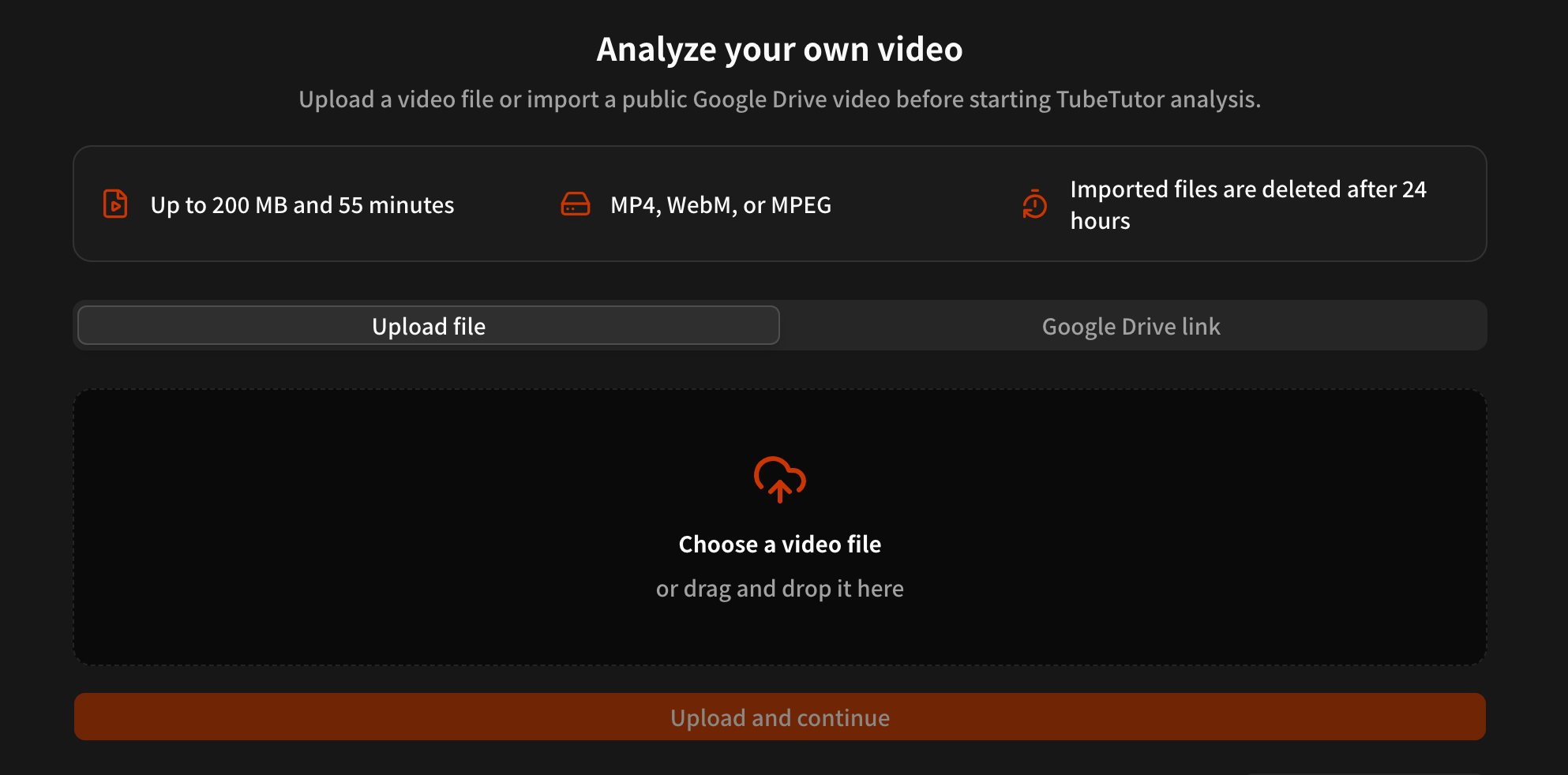
Summarize Uploaded Videos with AI Free – AI Video Summarizer Upload Tool
Summarize uploaded videos with AI using file upload or Google Drive. Learn the 200 MB and 55-minute limits for meetings, lectures, transcripts, notes, and summaries.
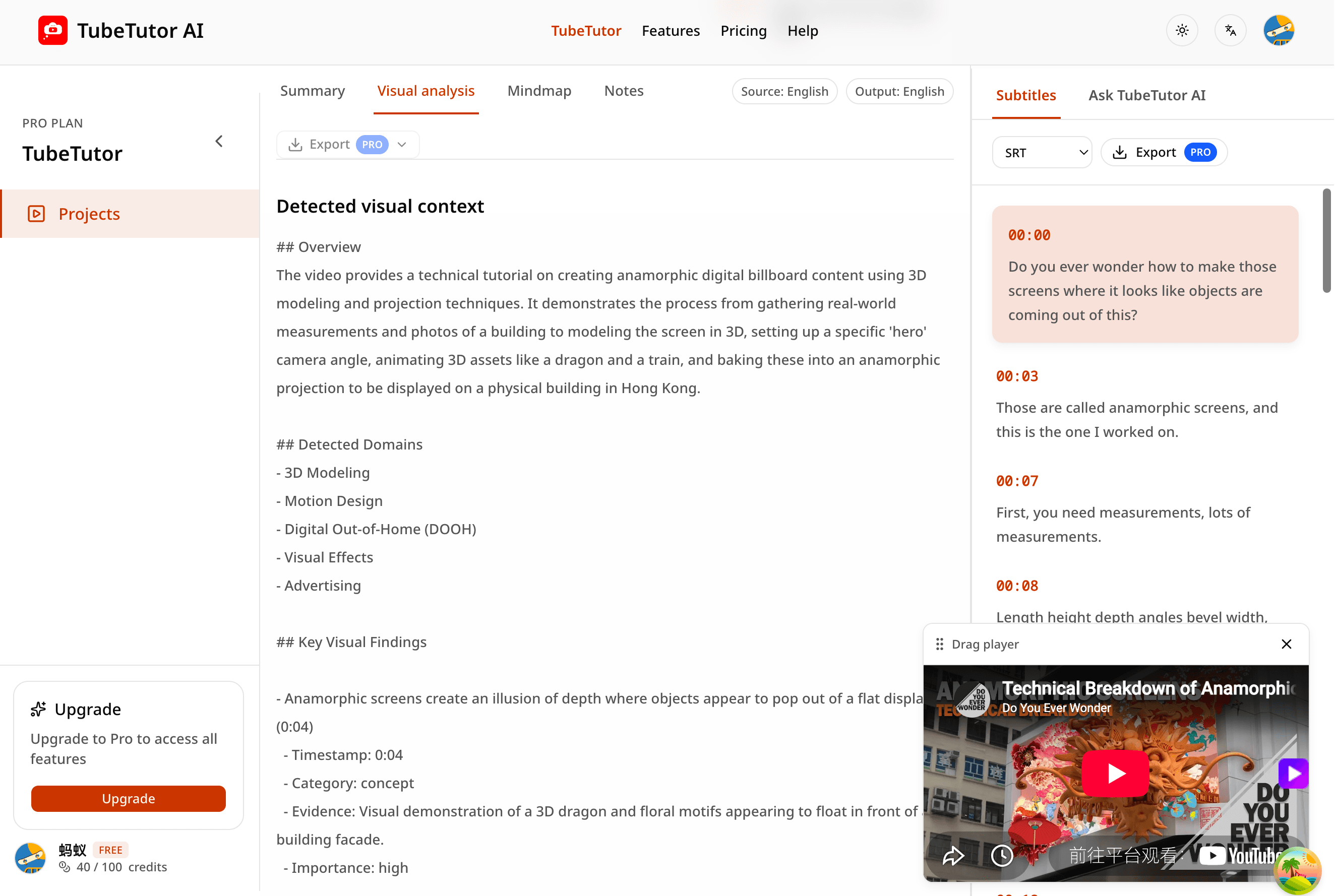
YouTube Transcript to AI Summary: Step-by-Step Guide
Turn a timestamped YouTube transcript into a useful AI summary while preserving source context, checking accuracy, and building better study notes.
TubeTutor Updates
Learn faster from video
Get product updates, AI video learning workflows, and tips for turning tutorials into summaries, mindmaps, and notes.