LogoTubeTutor AI
  • TubeTutor
  • Pricing
  • Help
  • Blog
LogoTubeTutor AI

Turn video tutorials into AI summaries, translated transcripts, mindmaps, notes, and Notion-ready knowledge.

X (Twitter)YouTube
Contact: support@tubetutor.topLearn faster withLogoTubeTutor
Product
  • Features
  • Pricing
  • FAQ
Resources
  • Blog
  • Changelog
Company
  • About
  • Contact
  • Waitlist
Legal
  • Cookie Policy
  • Privacy Policy
  • Terms of Service
© 2026 TubeTutor AI. All Rights Reserved.
  1. Home
  2. Features
  3. YouTube Visual Analysis

Extract Step-by-Step Actions from Any Tutorial Video — No Transcript Needed

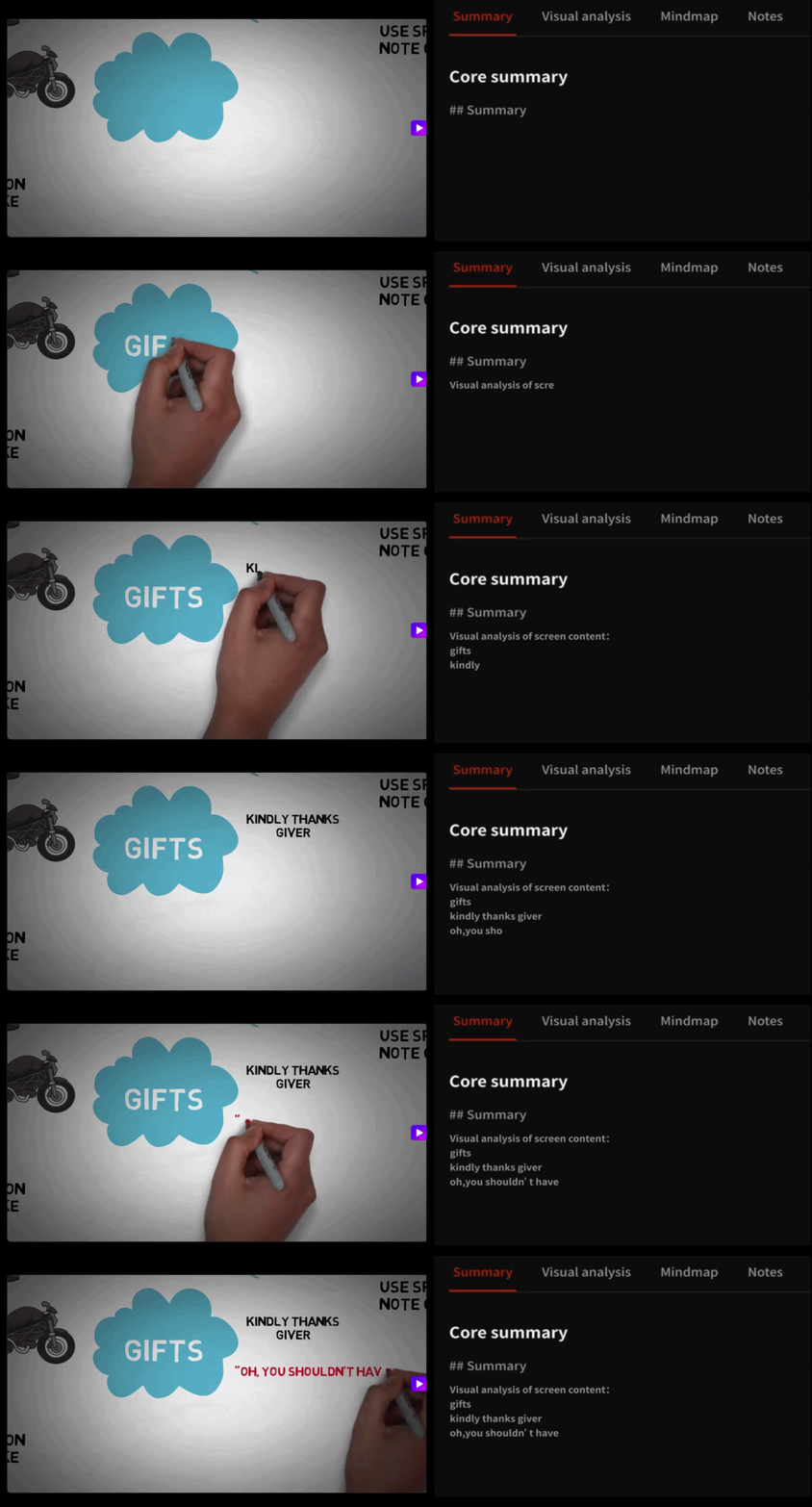
Go beyond subtitles. TubeTutor analyzes what appears on screen and organizes important actions, objects, tools, text, measurements, and procedures into structured visual findings.

youtube-visual-analysis

How Visual Analysis Works — No Subtitles Required

  1. 1

    Paste a Tutorial Video URL

    Add a coding walkthrough, software demo, repair guide, cooking lesson, design tutorial, experiment, or another visually rich YouTube video. Create a saved project and open Visual Analysis. The visual task can inspect the source video even when a transcript is unavailable.

  2. 2

    AI Identifies What Happens on Screen

    TubeTutor analyzes visible scenes and confirmed spoken context to detect important actions, interfaces, objects, tools, materials, code, charts, measurements, warnings, and on-screen text. It records evidence and approximate timestamps instead of inventing details that cannot be confirmed.

  3. 3

    Review a Structured Step-by-Step Guide

    Use the generated overview, key visual findings, and time-ordered procedures as a reference. Return to the source timestamps when you need context, then download the supported study document as Markdown or PDF or send supported sections to Notion.

What You Can Do with Visual Screen Analysis

Developers Following Coding Tutorials

Turn a long coding walkthrough into a reference for terminal commands, file edits, configuration screens, and important UI interactions. Visual findings preserve the order and approximate timestamps, so you can return to the original moment when a command or setup detail needs verification.

Designers Learning New Tools

A Figma or Photoshop tutorial contains menu paths, panel changes, layer operations, and shortcuts that subtitles may never name. Visual Analysis can capture confirmed interface text and actions, helping you build a checklist that is easier to follow at your own pace.

DIY & Repair Enthusiasts

Repair, construction, cooking, and hands-on videos often communicate through tools, materials, measurements, and physical actions. Extract the important sequence and safety evidence into a written reference, then keep the original timestamp available when a movement needs closer inspection.

Onboarding & Training Teams

Analyze a product walkthrough or internal training recording and turn confirmed screen actions into the foundation of an SOP. Teams can review the structured procedure, check source evidence, and export the project material instead of asking every new hire to search through the recording.

Visual Video Analysis FAQ

Can AI analyze a YouTube video without subtitles?

Yes. TubeTutor Visual Analysis sends the source video to a visual extraction workflow and does not require transcript text for that task. A normal TubeTutor project still performs its source preflight, but the visual result focuses on confirmed scenes, actions, objects, interfaces, and on-screen evidence rather than depending only on subtitles.

How do I extract steps from a coding tutorial?

Paste the tutorial, sign in to create a saved project, and open Visual Analysis. The result can identify time-ordered procedures, visible code, terminal commands, menus, tools, and interface actions. Use the timestamps and evidence fields to check the source whenever a command, file edit, or setup detail must be exact.

What's the difference between a transcript and visual screen analysis?

A YouTube transcript records spoken or captioned language. Visual Analysis looks for what is shown: interfaces, diagrams, objects, physical actions, code, measurements, warnings, and procedures. Use the transcript for exact wording and visual analysis for information the screen communicates beyond speech.

Can I get screenshots of each step in a tutorial video?

Not currently. Visual Analysis returns structured text, evidence, categories, and approximate timestamps for confirmed findings and procedures. It does not automatically create a screenshot for every step. Use the saved timestamp to return to the original YouTube video when you need to inspect the exact frame.

How does AI detect button clicks and menu actions in a video?

The visual extraction workflow analyzes scenes, visible labels, interface changes, and surrounding context. When it can confirm an action, it records the finding with evidence and an approximate timestamp. The prompt explicitly tells the model not to complete blurry text or invent controls it cannot verify, so uncertain material should remain excluded or marked unclear.

What types of videos work best with visual analysis?

Tutorials, demonstrations, repairs, experiments, cooking lessons, fitness instruction, product walkthroughs, design videos, and technical training are strong candidates because important information appears on screen. Clear video, readable interface text, stable camera work, and visible actions help. Results should still be checked against the source before high-stakes use.

Is there a free tool to turn a tutorial video into a written guide?

New TubeTutor accounts receive the current one-time starter credits and a first-video experience guarantee under the active credit policy. Visual Analysis requires sign-in and uses the current per-minute AI feature rate, which is shown through the saved-project workflow. Existing successful results can be reviewed again without regenerating the task.

Connect Visual Evidence to the Rest of Your Project

YouTube Transcript Generator

Generate Transcript

YouTube Mind Map Generator

Create a Video Mind Map

YouTube Video Note Taker

Start Taking Video Notes

Export YouTube to Notion

Analyze and Export to Notion

Turn what the tutorial shows into steps you can review

Analyze the screen, preserve timestamped evidence, and build a written reference without relying on subtitles alone.