LogoTubeTutor AI
  • TubeTutor
  • Pricing
  • Help
  • Blog
LogoTubeTutor AI

Turn video tutorials into AI summaries, translated transcripts, mindmaps, notes, and Notion-ready knowledge.

Contact: support@tubetutor.topLearn faster withLogoTubeTutor
Product
  • Features
  • Pricing
  • FAQ
TikTok Tools
  • All TikTok Tools
  • TikTok Video to Text
  • TikTok Video Note Taker
  • TikTok Video Summarizer
Instagram Tools
  • All Instagram Tools
  • Instagram Reel Summarizer
  • Instagram Reel to Text
Resources
  • Blog
  • Changelog
Company
  • About
  • Contact
  • Waitlist
Legal
  • Cookie Policy
  • Privacy Policy
  • Terms of Service
© 2026 TubeTutor AI. All Rights Reserved.
  • English
  • 中文
  • 日本語
  • 한국어
  1. Home
  2. Features
  3. Export YouTube to Notion

Export YouTube Video Summaries, Notes & Transcripts to Notion Instantly

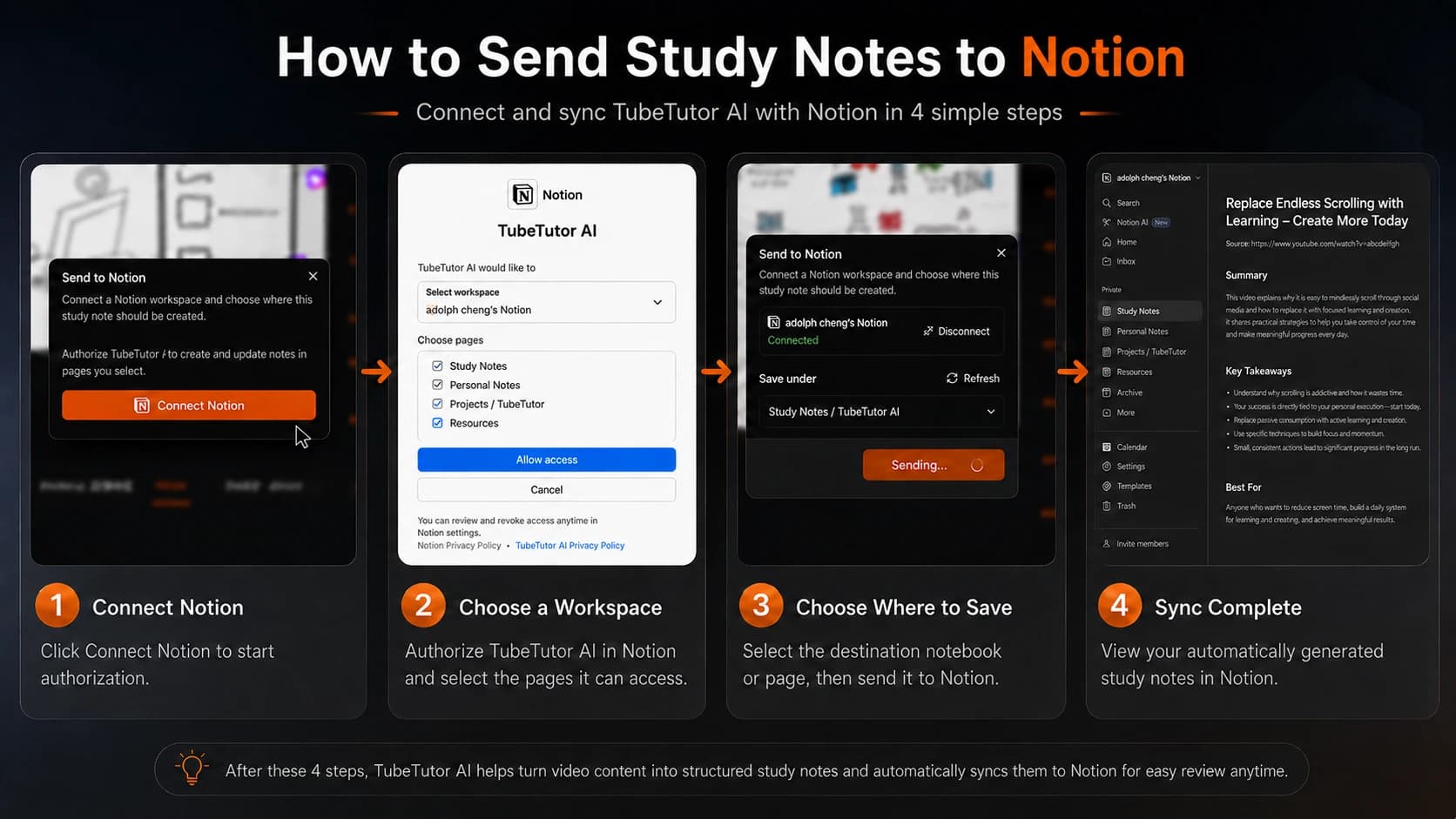
Turn a saved TubeTutor project into a structured Notion page. Connect your workspace, choose a parent page, and create or update the mapped document without copying sections by hand.

youtube-to-notion

How to Save YouTube Content to Notion

  1. 1

    Analyze Your Video in TubeTutor

    Paste a YouTube URL and create a saved project. Review the transcript, chapters, and automatic video summary, then add any visual analysis, mind map, or personal notes you need before exporting.

  2. 2

    Connect Your Notion Workspace

    Open the Pro Export menu, choose Send to Notion, and authorize TubeTutor through Notion OAuth. Select a page that the integration can access. TubeTutor remembers the connected workspace and default destination, and the dialog also provides refresh and disconnect controls.

  3. 3

    Create or Update a Formatted Notion Page

    TubeTutor sends the saved source link and available project sections as structured Markdown that Notion converts into headings, lists, and text blocks. The first export creates a page under the chosen parent; later exports update the page already mapped to that project.

Why Export YouTube Content to Notion

Students Building a Study Workspace

Store each lecture’s source link, summary, chapters, transcript, visual findings, mind map, and timestamped notes under the appropriate class page. Before finals, search your Notion workspace for a concept and reopen the TubeTutor project when you need the interactive video context.

Content Teams Sharing Research

One teammate analyzes a competitor interview or industry talk and sends the structured result to a shared Notion page. Everyone receives the same source reference, overview, chapters, findings, and transcript without separately watching the entire recording before the discussion can begin.

Developers Documenting Learning

Turn coding tutorials into permanent reference pages with the original video, summarized takeaways, detected screen details, a mind map, and transcript text. When an implementation detail becomes relevant months later, search Notion first and follow the saved project link back to TubeTutor.

Knowledge Base Builders

Build a searchable second brain from the videos worth keeping. Instead of relying on YouTube history, give each source a structured page under the right Notion parent. Re-export after improving the TubeTutor project and the existing mapped page is updated rather than duplicated.

YouTube to Notion Export FAQ

How do I save a YouTube video summary to Notion?

Analyze the video in a signed-in TubeTutor project, then open the Pro Export menu and select Send to Notion. Authorize your workspace if it is not connected, choose a parent page available to the integration, and send the document. TubeTutor creates the page on the first export and updates the mapped page on later exports.

Is there a free way to export YouTube notes to Notion?

The Notion destination is part of TubeTutor’s Pro study export, so it requires a signed-in account, active export access, an authorized workspace, and the current successful-export charge. Guests can review core results for one video up to 5 minutes but cannot use full export, connect Notion, or save a project.

What format does the Notion export use?

TubeTutor builds a structured Markdown document from the saved project and sends it through Notion’s API. Notion turns the headings, bullet lists, links, transcript disclosure, and nested mind map outline into editable page blocks. The result remains searchable and can be reorganized with the rest of your Notion workspace.

Can I export transcripts with timestamps to Notion?

Yes. When a saved project has transcript segments, the Notion document includes the available transcript text with its timestamps inside a collapsible details section. Chapters and personal notes also retain their saved time values. These times provide source context, while the project and source links take you back to the interactive video experience.

Does the export include the original YouTube link?

Yes. The exported document starts with the saved project title and original source URL. This preserves provenance even after the material has been reorganized in Notion. When a mind map is available, the document also includes a link back to the interactive TubeTutor mind map for that project.

Can I choose which Notion database to send content to?

TubeTutor currently lets you choose an accessible Notion parent page rather than presenting a separate database-field mapping workflow. Notion only returns pages shared with the connected integration. If the intended location is missing, grant the integration access in Notion and use Refresh before selecting the destination.

What TubeTutor tools support Notion export?

The structured project document can use content created with the YouTube Video Summarizer, YouTube Video Note Taker, YouTube Transcript Generator, YouTube Mind Map Generator, and Visual Analysis. Only the sections available in the saved project are included.

Do timestamps work inside Notion after export?

Timestamp values remain visible in exported chapters, transcript lines, mind map nodes, and notes. They are not all converted into automatic Notion playback controls. Keep the original YouTube source link and the TubeTutor project link with the page so you can return to the interactive player when you need to inspect a specific moment.

Haven't Analyzed Your Video Yet? Start Here

YouTube Video Summarizer

Summarize a YouTube Video

YouTube Video Note Taker

Start Taking Video Notes

YouTube Visual Analysis

Analyze Tutorial Visuals

YouTube Transcript Generator

Generate Transcript

Put your next video project where your knowledge lives

Analyze the source, connect Notion once, and keep the structured result inside the workspace you already search and share.