LogoTubeTutor AI
  • TubeTutor
  • Pricing
  • Help
  • Blog
LogoTubeTutor AI

Turn video tutorials into AI summaries, translated transcripts, mindmaps, notes, and Notion-ready knowledge.

Contact: support@tubetutor.topLearn faster withLogoTubeTutor
Product
  • Features
  • Pricing
  • FAQ
TikTok Tools
  • All TikTok Tools
  • TikTok Video to Text
  • TikTok Video Note Taker
  • TikTok Video Summarizer
Instagram Tools
  • All Instagram Tools
  • Instagram Reel Summarizer
  • Instagram Reel to Text
Resources
  • Blog
  • Changelog
Company
  • About
  • Contact
  • Waitlist
Legal
  • Cookie Policy
  • Privacy Policy
  • Terms of Service
© 2026 TubeTutor AI. All Rights Reserved.
  • English
  • 中文
  • 日本語
  • 한국어
  1. Home
  2. Features
  3. YouTube Mind Map Generator

Generate Mind Maps from YouTube Videos with AI

Paste a YouTube link and transform the video’s core concepts, supporting ideas, and hierarchy into a visual map you can edit and export.

youtube-mind-map-generator

How This YouTube Mind Map Generator Works

  1. 1

    Paste a YouTube URL

    Add the lecture, product walkthrough, technical talk, or research video you want to organize. TubeTutor checks the source, available captions, language, and estimated analysis cost before processing begins.

  2. 2

    Auto-Generate a Mind Map

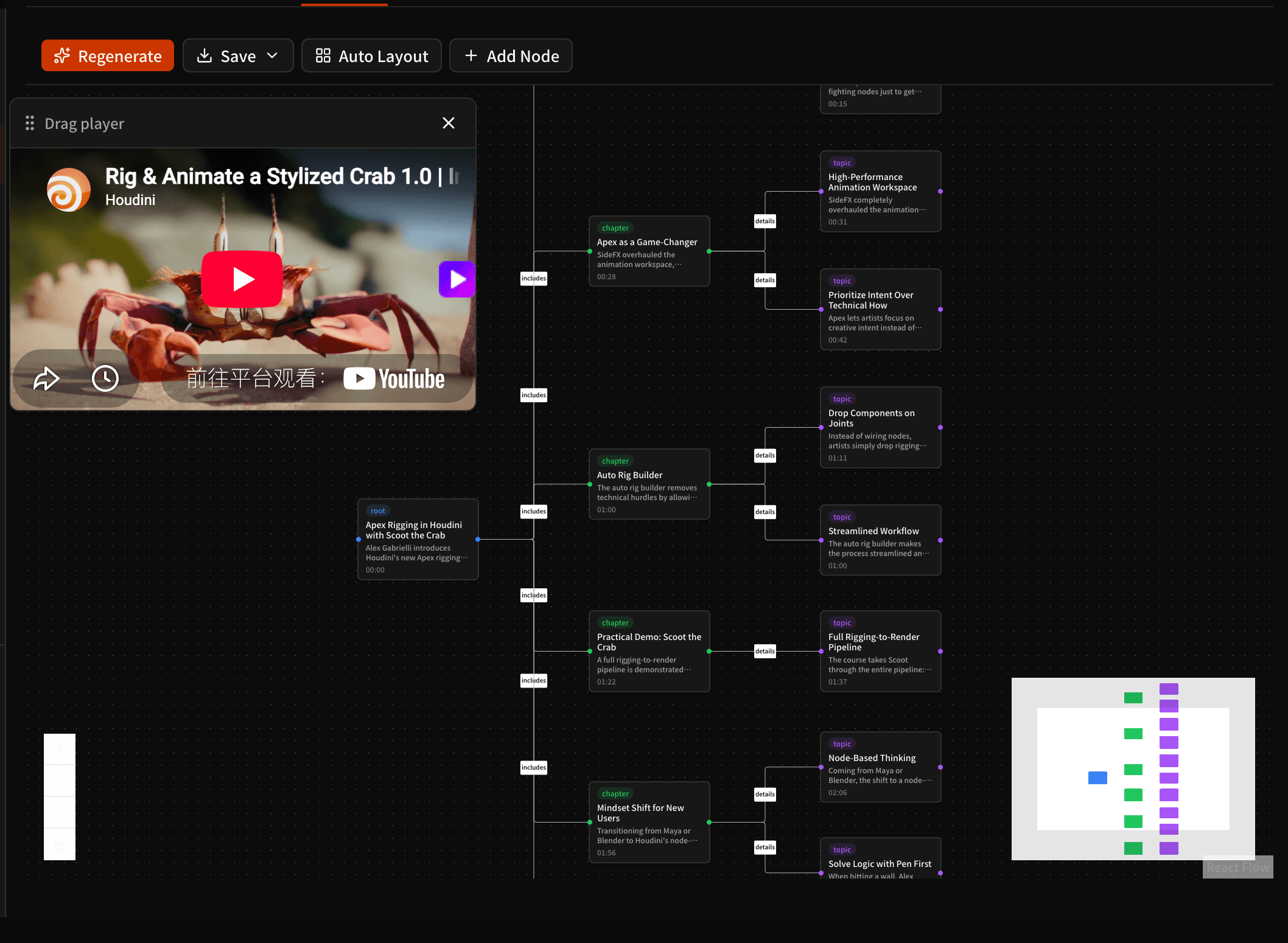
    AI analyzes the transcript and video structure, extracts the central topic and supporting concepts, and turns their hierarchy into connected root, chapter, and detail nodes instead of a flat list of notes.

  3. 3

    Edit & Export

    Rename, add, delete, style, and automatically arrange nodes in the editor. Save the mind map as SVG or high-resolution PNG; eligible Pro users can also include the current map in a downloadable PDF study pack.

Use Cases for YouTube Mind Maps

Students

Turn a long lecture into a visual revision guide that shows the subject, major branches, and supporting details at a glance. Use the hierarchy to plan exam review, identify gaps, and return to timestamped source moments when a concept needs deeper study.

Project Managers

Convert product introductions, technical presentations, and recorded planning sessions into a visual project outline. Edit node labels and relationships as the discussion becomes a brief, requirements document, onboarding guide, or shared map of decisions and dependencies.

Researchers

Map the main claims, authors, methods, and contrasting viewpoints in literature reviews, conference talks, and expert interviews. The visual structure helps reveal where ideas agree, conflict, or depend on one another before you return to the transcript for precise evidence.

Visual Learners

Replace a hard-to-follow linear stream with a spatial model of the material. Seeing concepts as connected branches can make complex explanations easier to internalize, while editable nodes let you restate relationships in your own words and build a map that matches how you think.

YouTube Mind Map Generator FAQ

How do I make a mind map from a YouTube video?

Paste a supported YouTube URL into TubeTutor and confirm the preflight analysis. The project processes the available transcript or required AI transcription, then the Mindmap module extracts the central topic, major branches, and supporting details into connected nodes. Open the Mindmap tab to review the result, follow timestamp references, and refine the structure in the editor.

Can AI create a mind map from a video?

Yes. AI can use a video transcript and its chapter context to identify major concepts and organize them into a hierarchy. The result is a starting model rather than unquestionable source evidence. TubeTutor keeps the map in the same project as the video and transcript so you can check the relationships, correct labels, and add details that the automated structure missed.

Is there a free AI mind map generator?

Mindmap is not included in the signed-out guest preview. Register or sign in to generate, edit, save, and export a Mindmap with a private project. New accounts receive 200 starter credits once, valid for 30 days, and generation follows the active credit price.

Can I edit an AI-generated mind map?

Yes. TubeTutor’s editor lets you rename nodes, add child nodes, delete unwanted nodes, change node colors or styles, and apply automatic layout after restructuring the map. That makes the generated result a working visual document you can adapt to your own terminology, study plan, research framework, or project structure.

Can I export a mind map as PDF?

The Mindmap editor directly saves the visual map as vector SVG or high-resolution PNG. Eligible Pro users can also export a broader study pack as PDF, and that document includes the current mind map alongside the project summary and other study content. TubeTutor does not label the PDF option as a standalone mind-map-only export.

Does the YouTube mind map include timestamps?

Generated nodes can include timestamp references that connect important concepts back to the source video. Use those references to revisit the relevant moment, hear the surrounding explanation, and verify how a visual branch relates to the original material. Timestamp coverage depends on the generated map and source transcript rather than appearing on every node.

Do mind maps help with studying?

Mind maps can make a complex topic easier to review by showing hierarchy and relationships in one visual space. They are especially useful for active study when you edit labels, reorganize branches, recall what belongs under each concept, and return to the source for evidence. A generated map works best as a starting structure that you actively refine.

What's the difference between a summary and a mind map?

A summary explains the main ideas in a linear reading order, while a mind map emphasizes hierarchy and connections between concepts. Use the map when spatial relationships help you think, or open the YouTube Video Summarizer when you want a concise narrative overview and key takeaways you can read from start to finish.
Related TubeTutor features

YouTube Video Summarizer

Summarize a YouTube Video

YouTube Chapter Generator

Generate Video Chapters

YouTube Transcript Generator

Generate Transcript

YouTube Video Note Taker

Start Taking Video Notes

YouTube Visual Analysis

Analyze Tutorial Visuals

Export YouTube to Notion

Analyze and Export to Notion

Turn a complex video into a map you can refine

Generate an editable visual structure without leaving the TubeTutor project.