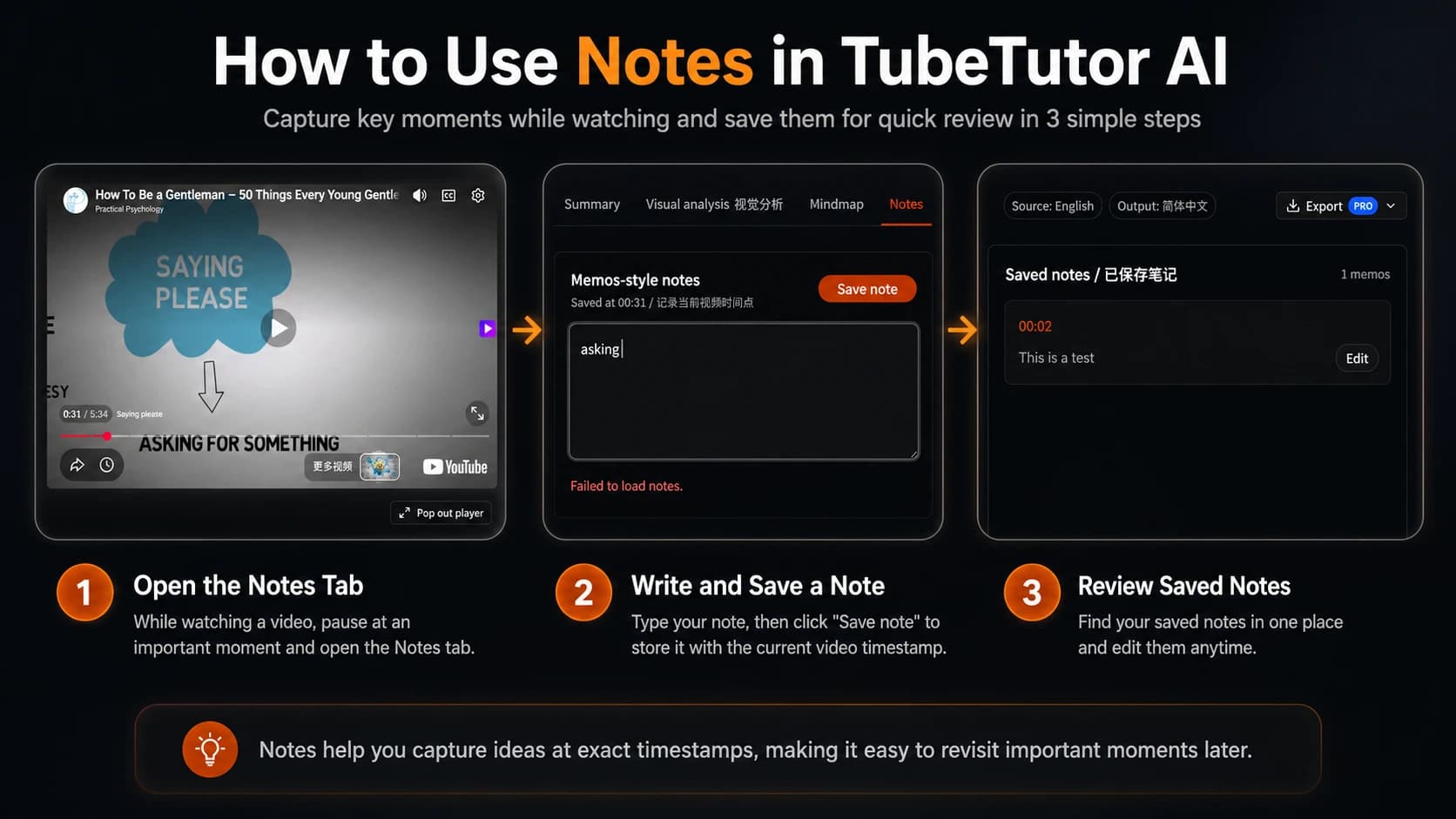
How do I take notes while watching a YouTube video?
Paste the video into TubeTutor, complete the source preflight, and sign in to create a saved project. Open the Notes tab while the video plays, write your note, and save it. TubeTutor records the current playback time with the note. Selecting the saved timestamp later seeks the connected player back to that moment.
Is there a free tool to take timestamped notes on YouTube videos?
TubeTutor does not charge credits for manually creating or editing notes, and a new account receives the current one-time starter allowance for saved analysis. Notes still require sign-in because they are stored with a private project. Other source processing, AI features, and Pro exports follow the active credit and plan rules shown before use.
Can I export my YouTube notes to Notion?
TubeTutor includes an authenticated Notion export for the supported structured study document. Connect your workspace, choose an accessible parent page, and send the project material there. The current standalone PDF study export includes personal notes; the Notion document includes the supported saved project sections.
What's the best YouTube note taking tool for students?
A useful student tool should keep notes beside the source video, attach a reliable timestamp, and make the project easy to reopen. TubeTutor combines those note controls with synchronized subtitles, chapters, summaries, visual analysis, and mind maps, so a lecture can move from first watch to structured revision without losing its source context.
How do timestamps work in video notes?
TubeTutor records the player’s current time when you save a note. The saved time appears as a button above the note. Selecting it seeks the connected YouTube player to that position, while notes close to the current playback time receive a visual highlight. You can edit the note later without changing its source timestamp.
Can I take notes on YouTube videos without an account?
Not currently. Guests can temporarily review source-language subtitles, chapters, and the first automatic summary for up to two distinct videos per local day, but Notes requires sign-in because the content is saved privately with a project for later access. The sign-in flow preserves the selected video and requested Notes intent so you can continue after authentication.
What format can I export my video notes in?
The current Pro study export offers Markdown and PDF. The PDF includes timestamped personal notes alongside the available summary, visual analysis, and mind map. The structured Notion workflow is a separate destination for supported saved project sections. Export access and the current credit charge are checked when you start the export.
How is a video note taker different from a video summarizer?
A video note taker records the ideas you choose while watching and anchors them to your own timestamps. A YouTube Video Summarizer uses AI to organize the video’s main ideas into an automatic overview. Use Notes for personal observations and the summary for a quick structured understanding of the whole source.